Ink Spout

Ink Spout has evolved into Ink Spouts now. It is available at a new address now. www.inkspouts.com We have rebooted it and It's back with lots of stuffs . :D Just go and check it out.

Featured Posts

Ink Spout has evolved into Ink Spouts now. It is available at a new address now. www.inkspouts.com We have rebooted it and It's back with lots of stuffs . :D Just go and check it out.
Saturday, March 24, 2012

Ghost in the Wires

Ever heard of Kevin Mitnick???
If you call yourself a computer enthusiast or tech geek and you havnt heard of him then believe me you would wanna know about him and his story.

I read his first book The Art of Deception couple of years back and loved it. When this one came out I was very excited and boy i wasnt disappointed.

If you happened to read Steve Jobs(the book) or Paul Allen's bio its the same. Very exciting and thrilling

Read More.....

0 comments

Happened to catch this old pic starring Kate Beckinsale.
A reporter cant reveal its source because if they did then who would go to them and its also a legal thing.
Its mentioned in loads of legal or crime thrillers(Girl with the dragon tattoo,damages etc)
The movie is about such a story based on real life events. Its an excellent movie with a really good ending.Watch it if you havnt already
http://www.facebook.com/CriticalCritique


Read More.....

Thursday, March 15, 2012 0 comments

With this post I am starting Tech-Jargon series which will give you a brief overview of terminology and concepts in simple manner.
Often I find many of my friends and juniors confusing between the dataspeed i.e. kbps and KBps. Firstly the important question arises whether there is any difference between these two terms?
For your surprise the answer is YES.
Before going into explanation let’s make few terms clear to feel the thing.
b = bit (the most basic unit a computer handles)
B = byte (1 byte = 8 bits)
K = 1,024 ; k= 1,000
so now I think , many things are pretty much clear. In normal adaption both “K” and “k” are considered as same because “K” is recently introduced and faces low adoption (also there is not much difference in both).
So the basic difference is clear by their full form that are "kbps/Kbps - kilobits per second" and "kBps/KBps - KiloBytes per second".
Whenever any ISP claims to provide the data transfer speed in Mbps it simply means Megabits per second. In other words, for a 1Mbps broadband connection, it will take minimum 8 seconds (1000/125KBps) to download a 1 MB (megabyte) file from the internet. Most Broadband companies define 1K as 1,000 and not as 1,024 which is the used for computing. So next time you are looking in to your internet speed do keep this in mind.

General Transformation of Speed

so the overall general conclusion is that whenever you have speed in Mbps or mbps,
 divide that by 8 and that will be your original downloading speed.
I hope you have made your doubts clear and enjoyed this info-ride.
If you liked it, you have full right to comment (& you should use it ;-)) and share it.
Read More.....

Sunday, January 15, 2012

Love to read news and get updated with the happenings all over the world? 
Can't visit each time on your favourite website or blog?
Tried many RSS readers but didn't find any good reader!!!
Well, here is the answers of your questions........
FeedDemon is a free RSS news feed reader which has a clean,effective and easy to understand user interface. It's quite handy as well as an easy to configure and use software but still is feature-rich. It provides three different views for going through a number of posts and news feeds.Also it comes with a built-in web browser which makes you enable to surf the web within the same window.


Let have a look on some promising features as given on publisher's website. 


1. Google Reader Synchronization
Use FeedDemon at home, your office, or anywhere you go and keep your feeds, tags and shared items synched between locations.
2. Sharing
FeedDemon's simple single-click sharing lets your friends subscribe to your favorite articles.
3. Tagging
Assign your own keywords to items, making it easy to classify and locate articles you've previously read.
4. Watches
Tell FeedDemon to let you know when your keywords appear in any feed you're subscribed to.
5. Search Feeds
Get alerted when your keywords appear in any feed, regardless of whether you're subscribed to it.
6. Podcasts
Let FeedDemon automatically download audio files and copy them to your iPod or other media device.


In a nutshell, FeedDemon is a small packet,big blast.
finally a nice demon ;-)


Download it and and stay informed with the latest news and information.

Read More.....

Friday, January 13, 2012 0 comments

Moving forward in our new series Reclaim your Nascent PC, here I am going to share a new tip with you. Often whenever you surf internet, temporary internet files are stored in your system for quick viewing. But with increasing time, the number of these files also increases.
Further, whenever you use a program, it sometimes saves temporary information which keeps on occupying more and more space in your harddisk.
Morever, windows keeps copies of all pictures, videos and other documents thumbnails. In addition to these, whenever your system encounters any problem or error, it stores the relevant information in files for error reporting and solution checking.

The sum of all above facts is that these useless(for a normal user :D) occupied memory space can be freed without any problem. You don’t need any particular software or utility for this purpose.
Here we go in simple steps.
  • Press Win + E key or click on My Computer. Right Click on your Operating System drive (i.e. C drive commonly) and choose "Properties".


  • In Properties Dialog box, choose "Disk Cleanup" option.


  • After clicking on that button, there will an activity like below in image.It will take few seconds.


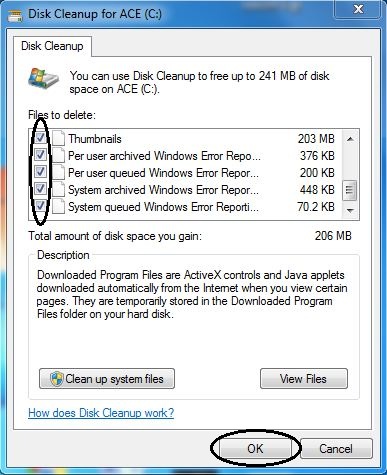
  • Now there will be shown a disk cleanup window. Check all appropriate options and click on OK button.


  • On clicking OK button, again a window will appear showing disk cleanup process.After finishing that, you are done.

This is the whole thing you have to do.
Simple!!!!!!!!!! Isn't it? :)
If you like it,leave your precious comment as feedback.
Meanwhile you 'd like to check first post of this Series out.

See you Soon. Till then Enjoy your Nascent PC. :-)
Read More.....

Tuesday, December 20, 2011 0 comments


Got your Facebook timeline profile!!!!!!
Yes then yon know how to keep pace with time. Yet not , Don't worry, get your Facebook timeline profile here and click on "Get it now".
If you are lazy enough to do that then don't worry ,  Facebook will do that for you on 22th of December. ;-)

Welcome Page of Facebook Timeline
This is how your profile will look like..


So in this post i am trying to show few points of Timeline feature of profile.
You can actually turn your profile into your autobiography as in Facebook Timeline , you can share your all lifetime events(since birth), your photos, stories and all other experience that reflects your life.


You can add any information of your life whether it be your first school or the day you met with your first crush or the day you got  first in any competition at that particular time. Isn't it cool!!!!
If you have added your family members in your Facebook profile then they will also be shown in your Timeline .


So you can easily conclude that a well-managed and informative timeline is not less than an Autobiography (But Obviously You're not going to get Booker for that ;-))
Life Till Now in Facebook Timeline

So what are you waiting for?
Just gear up with a mug of Tea/Coffee and Create your Autobiography using Facebook Timeline with intuitive and Well-descriptive photo rich features.

Have A Great Autobiography!!!!  :-)


P.S.- If you find this article interesting, share this with your friends and Let me know how much you liked it by commenting below.
Read More.....

Saturday, December 10, 2011 0 comments

Started your system and now sitting before your system and waiting for loading its services and applications (in simple language taking too long to start) takes little longer and it irritates too when you want to do your work quickly.
Sounds similar…
It occurs when you have installed application and softwares in a large number and these application makes their places in windows startup list.
Obviously too many applications in startup, too much time to boot completely.
Here is a way to get rid off from this problem and it requires not any software.

Step 1 : Press Win+R key and Run window will appear. Type “msconfig” without quotes and hit OK.


Step 2 : Go to startup tab and uncheck irrelevant and unnecessary applications from here.


Step 3 : Now simply click Apply,OK and new dialogue Box will open with two options.
“Restart” and “Exit without restart”
choose as per your wish. And now you are done.


Enjoy your system with better performance. :D


Read More.....

Most Trending

Recent Posts

Recommend us on Google!

featured-slider

Labels

Bloggers.com

Bloggers - Meet Millions of Bloggers